Most AI efforts don’t fail because the model is weak. They fail because the organization tries to scale something that isn’t defined, owned, measured, or controllable yet. Here’s the scaling pattern that works in mid‑market reality.
Up to now, we’ve talked about the foundation: defining ‘good,’ ownership and escalation, proof of control, and data boundaries.
This post is the bridge between foundation and results: how you expand adoption without creating a mess you can’t defend – or a program nobody trusts.
The mistake I see is predictable: a team gets a small win and leadership says, ‘Great – roll it out everywhere.’
That’s how you end up with 27 different prompt styles, inconsistent outputs, unclear reviews, and a security team that feels blindsided. The wins stop coming.
Instead, scale like a product team. Not bureaucratic – just disciplined.
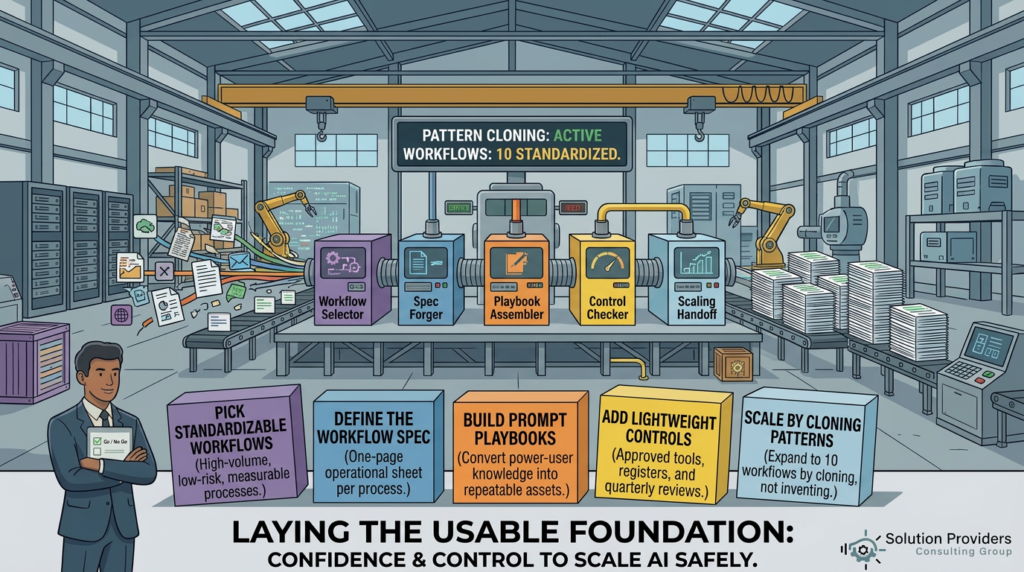
Step 1: Pick 2 – 3 workflows that are worth standardizing
Your first scaling set should have three traits:
- High volume (happens every week)
- Low-to-moderate risk (you can control review and data use)
- Clear ‘before vs after’ (easy to measure)
Examples that tend to work: first-draft client emails (with review), ticket summarization, internal SOP drafting, meeting recap + action list, proposal section outlines.
Step 2: Define the ‘workflow spec’ (one page each)
Before you scale, each workflow needs a simple spec. Not a policy – an operating sheet. I like a one-pager that includes:
- Purpose: What outcome is this workflow trying to produce
- Inputs allowed: Green/Yellow/Red boundaries (in plain language)
- Tool: where the work must happen (the approved path)
- Human review: required vs optional; what triggers escalation
- Definition of ‘good’: 3 – 5 bullet criteria (tone, accuracy, citations, formatting)
- Owner: value owner + risk owner (named)
- Metric: 1 – 2 measures you’ll track monthly
Step 3: Turn prompts into playbooks (so results aren’t dependent on one person)
If scaling means ‘teach everyone to prompt better,’ you’ll get uneven adoption.
Instead, create a small playbook per workflow:
- A standard prompt template (with placeholders)
- Two example inputs and ‘good’ outputs
- A review checklist (what to verify before sending/publishing)
Step 4: Add a lightweight control layer you can actually maintain
This is the part people overcomplicate. Remember the ‘proof of control’ questions:
“What did we allow? Who used it and where? What changed because of it?”
To answer those without slowing down, use a minimum set of controls:
- Approved tool list (and a default place to go)
- Workflow register (the 10 workflows you’re actively running)
- Simple logging/traceability at the tool/workflow level (not surveillance – just defensibility)
- Quarterly review: what stays, what changes, what gets retired
Step 5: Scale by ‘copy + adapt,’ not ‘reinvent’
Once you have 2 – 3 workflows running cleanly, scaling to 10 is not 7 new inventions.
It’s cloning a pattern:
- Copy the one-page spec
- Copy the prompt playbook skeleton
- Assign an owner
- Pick one metric
- Set review triggers
This is how you stay fast and consistent.
Decision gate: Are we ready to expand?
Before you add more workflows, ask three questions:
- “Do we have stable ‘good’ outputs?” (not perfect – stable)
- “Do we have clear ownership and review?” (no orphan workflows)
- “Can we show VOI without hand-waving?” (a baseline + a delta)
If you can answer ‘yes’ to those, expanding is low drama.
If you can’t, don’t scale the confusion. Tighten the spec, simplify the boundaries, and make the approved path easier.
Next, we’ll move into the practical artifact that makes all of this stick: the minimum viable AI policy – a one-pager people will actually follow.