
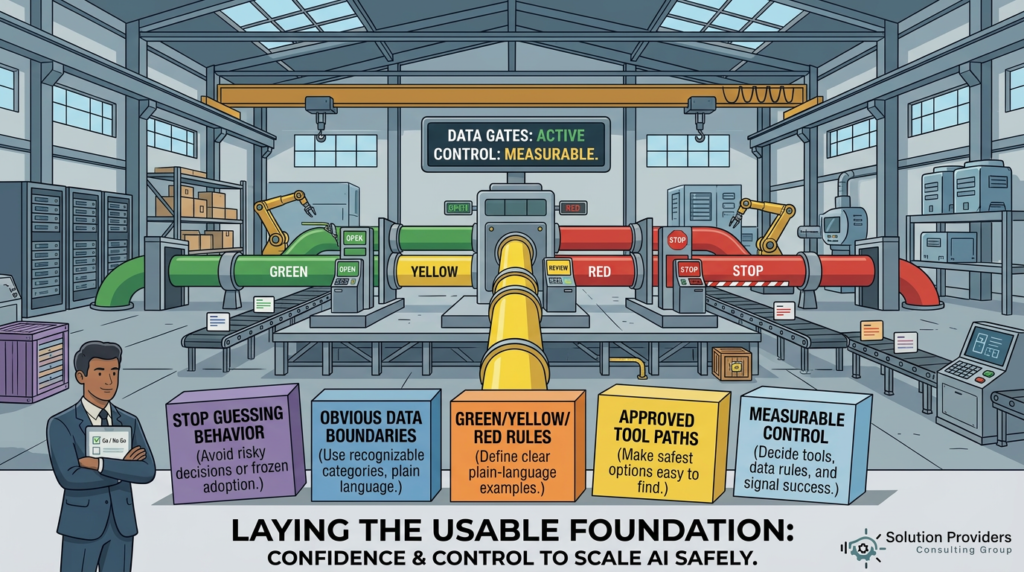
Most ‘shadow AI’ problems aren’t caused by bad people. They’re caused by unclear rules. If you want safe adoption, make the boundaries obvious – and make the approved path easy.
Here’s what I see over and over in mid‑market environments: leaders say they want AI adoption, but teams don’t know what they’re allowed to do with data – so they guess.
And when people guess, you get two outcomes:
- Risky behavior (copy/paste customer data into random tools because ‘it’s faster’).
- Frozen behavior (people stop using AI entirely because they don’t want to be the person who messes up).
Neither is what you want. The goal isn’t to police people – it’s to remove ambiguity.
A practical way to do that is to define data boundaries in plain language, using categories your business recognizes. For example:
- Green (OK to use): public website content, approved templates, generic process descriptions, de‑identified examples.
- Yellow (OK with an approved tool + purpose): internal SOPs, policies, non-sensitive project notes, internal FAQs – when the tool is approved and access-controlled.
- Red (NEVER paste into tools without preauthorized use case): customer PII, regulated data (HIPAA/PCI/etc), credentials, security details, pricing exceptions, legal/HR sensitive items.
Notice what that does: it gives people a decision they can make in five seconds.
This is also where the *approved path* matters. If the safest option is hard to use, the org will route around it. You’ll get shadow AI even with the best policy in the world.
So, the boundary conversation must include one operational question:
“Where do we want people to go when they need AI help – today?”
If the answer is, “we’re not sure”, that’s your signal. Don’t roll out another pilot or project. First, decide the tools, decide the data rules, and make the defaults obvious.
Next post, we’ll tie this together with a simple pattern for scaling: start with 2 – 3 workflows, define boundaries + ‘good’ + ownership, and then expand what you can measure and defend.